Skip to content
Back to projects
  • Information Architecture
  • UX/UI
  • Front-End

NCGA Stationery Template System

A constrained template engine for North Carolina General Assembly stationery: one locked structure, governed variable data, and print-accurate preview for all 170 members.

Role
Product Designer for internal operations. Workflow architecture and variable-data tooling
Year
2026
Built with
HTML/CSS/JS, PDF generation, governed data model, print-ready output, variable-data workflow

What I can show

This is an internal print-shop tool, so it isn’t publicly hosted. The screenshots use fictional legislator data; I can demo the live tool or walk through the code on request.

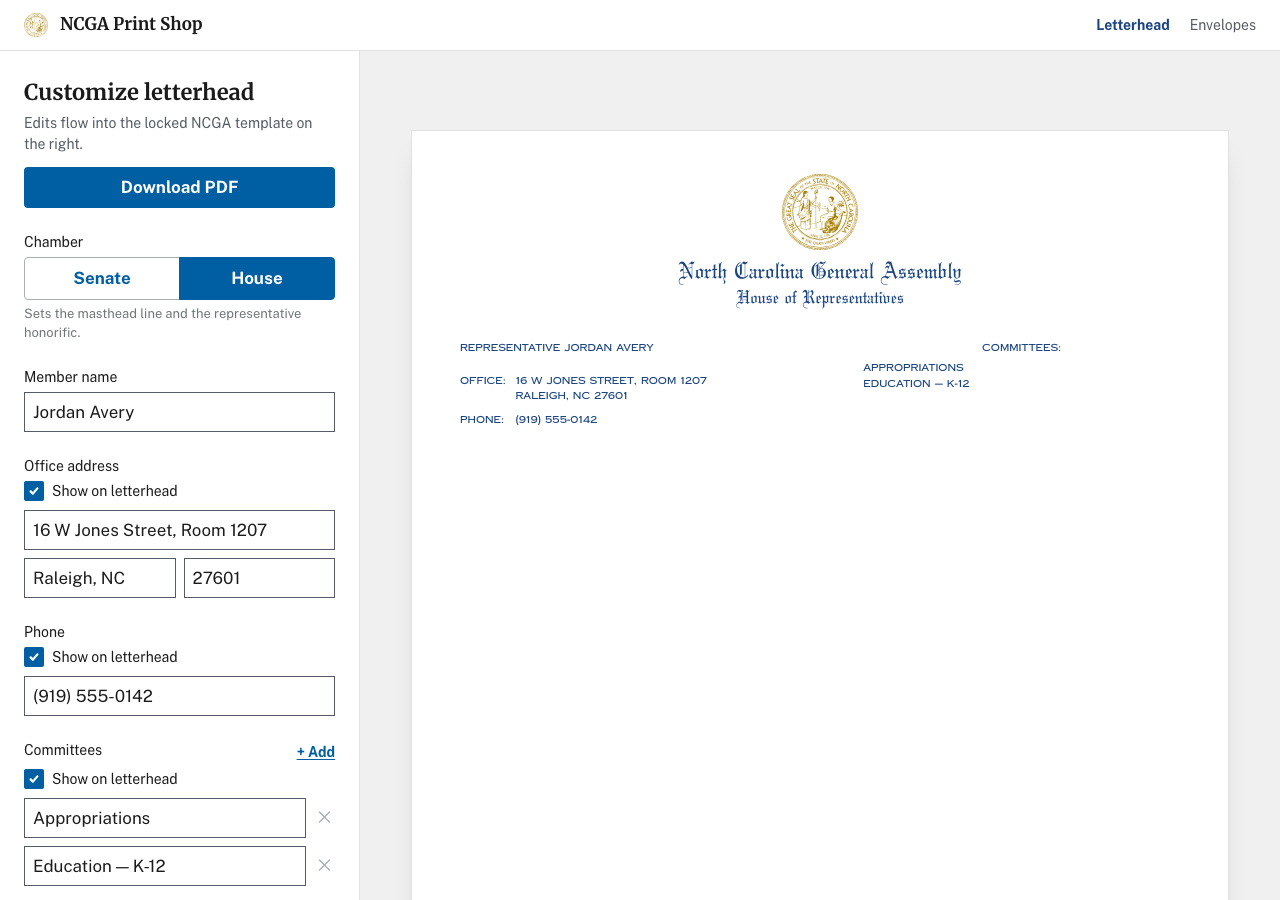
NCGA letterhead editor with a form sidebar and print-accurate preview of legislator stationery.

Overview

The North Carolina General Assembly print shop produces repeat stationery for all 170 legislators, including business cards, letterhead, envelopes, and related materials. Each order carries the same formal brand requirements but different contact data, committee lists, and chamber-specific wording.

I built a constrained internal template tool. Seal placement, masthead type, grid, and margins stay locked; staff edit only the fields production allows. One LegislatorRecord feeds letterhead and envelope layouts with print-accurate preview and PDF export.

Problem
Repeat stationery for all 170 NCGA members depended on files that could drift in spacing, color, and content.
Primary users
In-house print shop staff producing legislator letterhead and envelopes.
Design move
One locked template structure fed by a governed LegislatorRecord, so staff edit only what production allows.
Result
Personalized mailings to all 170 members now run in one press pass instead of two, with print-accurate preview, PDF export, and cleaner mail-merge handoff.

The Friction in Production

Before the system, repeat orders relied on separate files per legislator. Small differences in spacing, ink color, and committee data compounded across all 170 members. A simple phone number update could turn into file hunting and another chance for the layout to drift.

I designed the workflow around three production constraints:

  • Brand compliance. Seal, masthead, and typography had to stay fixed regardless of who edited the order.
  • Data variation. Names, addresses, committee lists, and chamber wording all changed, but the structure could not.
  • Repeat accuracy. The same legislator might reorder letterhead multiple times a session; each run had to match the last without reintroducing spacing or color drift.
Letterhead editor with a form sidebar and print-accurate preview of NCGA stationery.
Split-pane editor: governed fields on the left, locked template preview on the right. Sample data uses fictional legislator names.

LOCKED vs DATA-DRIVEN

The core information architecture decision was simple: production-approved variation lives in a typed record; everything else stays hardcoded and out of reach.

LOCKED elements include the state seal, “North Carolina General Assembly” masthead, licensed typefaces, page grid, margins, and recycle mark geometry.DATA-DRIVEN fields include member name, chamber, office address, phone, committees, and ink color, with visibility toggles that hide sections on the letterhead without deleting the underlying data.

A free-edit Word or InDesign template would have made the same drift easier to repeat. The constrained form works because it matches the real production boundary.

InputLegislatorRecord
Locked templateSeal, masthead, grid, type
OutputLetterhead or envelope PDF

Same Record, Different Surfaces

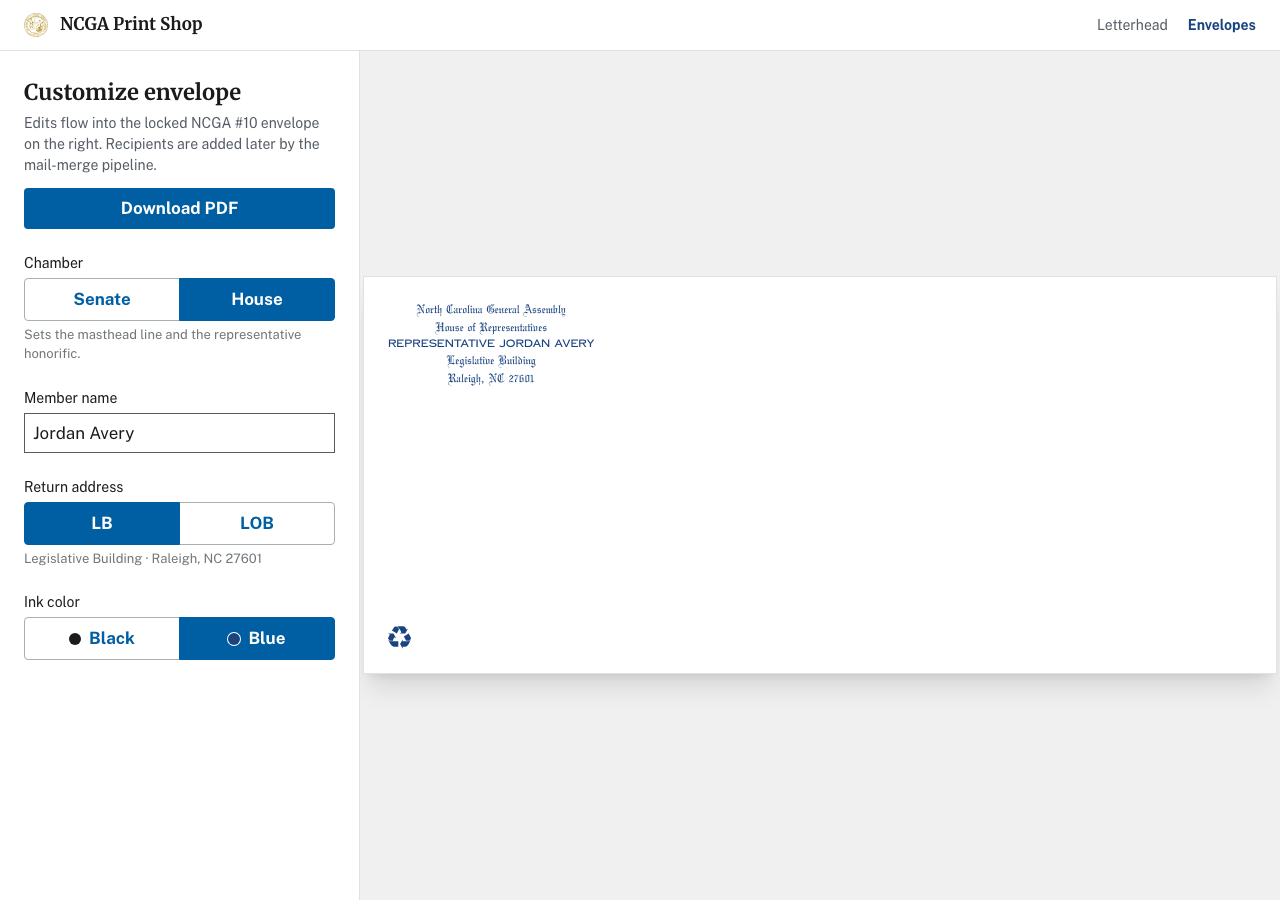
Letterhead and envelopes share one data model but not one form. The letterhead editor exposes the full record plus visibility toggles for address, phone, and committees. The envelope editor uses a field subset: no phone or committees, and return addresses constrained to two NCGA buildings (Legislative Building or Legislative Office Building) with fixed ZIP codes rather than free text.

Envelopes also omit the state seal, matching real production artwork, and explicitly defer recipient addresses to a downstream mail-merge pipeline. That boundary keeps the tool focused on bulk return-address stationery, not one-off mailing lists.

Envelope editor with building picker and print-accurate envelope preview.
Envelope surface: building picker instead of free-text address, no seal, recipients added later by mail merge.

Print Fidelity as UX

The on-screen preview is sized in real inches and points so staff can check print before exporting. Screen rendering uses DOM and Tailwind; PDF output uses a second renderer that shares the same business logic for chamber copy, ink colors, and visible committees. That split was deliberate: a screenshot export would not survive Acrobat, and DOM alone cannot produce reliable print PDFs.

Chamber selection drives both the masthead line and honorific automatically, so staff cannot accidentally pair “Senator” with House wording. Committee rows filter blank entries before preview and export, and long committee lists stress-test layout without breaking the locked grid.

Outcomes

Personalized mailings to all 170 members now go out in a single press pass instead of two because the templates produce mail-merge-ready PDFs the production line accepts as is.

Governing variable data through the template also reduced repeat-order mistakes. Staff no longer maintain parallel files that drift in spacing and color; edits stay inside explicit production rules and output stays consistent run to run.

This case study covers the letterhead and envelope editor slice of broader NCGA work. Related NCGA work includes a press-split calculator for job planning, identity work, troubleshooting, job tickets, proofing, and high-volume production workflows, not shown here.

Let’s build something useful.

If your team is working through a problem like this one, I’d like to hear about it.

Start a conversation